.webp)
.webp)
.webp)

Download TypeApp – email app, manage multiple accounts, iOS email tool, free email client, send from different addresses, Apple Watch compatible
Overview
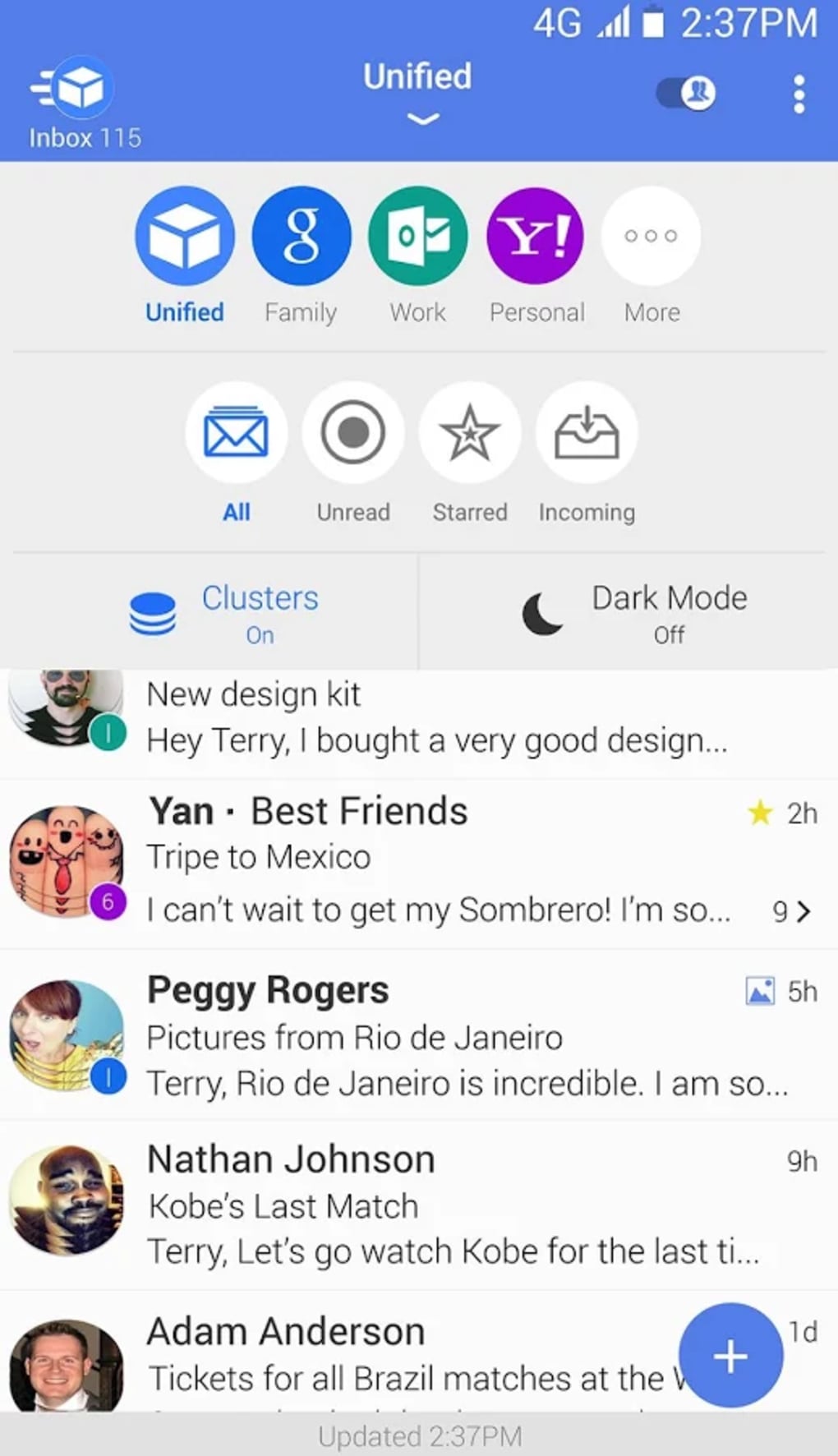
TypeApp is a free email application designed for users who manage multiple email accounts across personal and professional contexts. The app enables seamless integration of various mail accounts into a single interface, eliminating the need to repeatedly log in and out. This functionality is particularly beneficial for individuals who maintain distinct identities for work and private correspondence, allowing instant access to all messages from one centralized platform.
Built specifically for Apple’s ecosystem, TypeApp is optimized for both iPhone and iPad, offering a smooth experience across devices. Its clean, modern interface supports efficient navigation and task completion, even for users with limited technical expertise. The app supports integration with major email services including Gmail, Outlook, and Yahoo, ensuring broad compatibility.
It also includes features such as custom folder creation, message filtering, and a powerful search function to enhance organization and retrieval. With support for Apple Watch, users can receive and respond to emails directly from their wrist, maintaining connectivity on the move. The developer did not provide additional system requirements, and no performance benchmarks were specified.
The app is designed to be lightweight, with minimal impact on device performance. It is updated regularly to ensure ongoing security and feature improvements. TypeApp aims to deliver a secure, efficient, and user-friendly solution for modern digital communication.
Key Features & Capabilities
- Unified Mail Management – Users can connect and manage multiple email accounts from a single dashboard, streamlining access to personal, business, and other email identities.
- Send from Any Address – A distinctive feature allows users to send emails from different addresses without switching accounts, ideal for maintaining professional and personal identities.
- Custom Folders & Filters – Users can create custom folders and set up automated filters to organize incoming messages by sender, subject, or content.
- Powerful Search Function – A robust search tool enables quick retrieval of specific emails, even within large inboxes.
- Apple Watch Integration – Full compatibility with Apple Watch allows users to view notifications, read messages, and respond to emails directly from their wrist.
- End-to-End Encryption – The app incorporates end-to-end encryption to protect message content during transmission and storage.
- Two-Factor Authentication – Enhanced security is provided through two-factor authentication, helping safeguard user accounts from unauthorized access.
- Multi-Language Support – Available in English, Spanish, French, German, and Chinese, making it accessible to a global user base.
User Interface, Workflow & Performance
TypeApp features a clean, modern interface designed for intuitive navigation and efficient task execution. The layout emphasizes clarity and simplicity, with clearly labeled sections for inboxes, sent items, drafts, and folders. Users can quickly switch between accounts using a dedicated account selector, reducing friction during daily use.
The workflow is streamlined for common actions such as composing, sending, and organizing emails, minimizing the number of steps required. The app is designed to be accessible to users of all skill levels, including those who are not tech-savvy. It supports accessibility features such as screen reader compatibility, which benefits users with visual impairments.
The developer did not specify resource usage details, and no performance benchmarks were provided. However, the app is described as lightweight and efficient, with minimal impact on device performance. Stability is maintained through regular updates, which ensure compatibility with new iOS versions and address potential issues.
The developer did not provide additional information about CPU or RAM behavior. Performance observations are based on general software behavior patterns.
Compatibility & System Requirements
TypeApp is compatible with iPhone and iPad devices running iOS 13 or later. It is available exclusively through the App Store and is optimized for Apple’s ecosystem, including integration with iCloud, Apple ID, and Apple Pay. The app has a file size of 45.6 MB, indicating a relatively compact footprint.
It supports compatibility with major email services such as Gmail, Outlook, and Yahoo. The app is also compatible with Apple Watch, allowing users to manage emails on their wrist. The developer did not provide additional system requirements.
Exact hardware specifications were not listed. Compatibility information was partially provided. Users should ensure their device meets the minimum iOS 13 requirement for installation and operation.
Pros and Cons
Pros
- Free to download and use with no hidden costs
- Supports multiple email accounts in one interface
- Allows sending emails from different addresses without switching accounts
- Intuitive, modern UI suitable for non-technical users
- Apple Watch compatibility for on-the-go access
- End-to-end encryption and two-factor authentication for security
- Available in multiple languages for global accessibility
- Regular updates to maintain security and functionality
Cons
- Only available for iOS devices, limiting cross-platform access
- Exact system requirements beyond iOS 13 were not specified
- Resource usage details such as CPU and RAM consumption were not provided
- No information on backup or data export functionality
- Platform-specific ecosystem lock-in due to Apple ID and iCloud integration
FAQ Section
Is TypeApp compatible with Android devices?
TypeApp is currently available only for iOS devices. There is no official Android version or APK release mentioned in the provided information.
Can I use TypeApp without an Apple ID?
The app is designed to integrate with Apple’s ecosystem, including Apple ID. While basic functionality may be accessible, full features likely require an Apple ID for account setup and synchronization.
Is TypeApp secure for sensitive communications?
Yes, the app includes end-to-end encryption and two-factor authentication to enhance security. These measures help protect user data and prevent unauthorized access.
How often is TypeApp updated?
The app is updated regularly to ensure it remains secure and up-to-date with the latest features and improvements. The frequency of updates is not specified.
Can I use TypeApp offline?
While the app supports offline access to some cached data, full functionality requires an internet connection for email synchronization and sending messages.
Final Thoughts + CTA
TypeApp stands out as a capable, free email client tailored for Apple users managing multiple accounts. Its ability to unify personal and professional emails in one interface, combined with the unique feature of sending from different addresses without switching, makes it a valuable tool for communicators. The clean design, Apple Watch integration, and strong security features further enhance its appeal.
While platform exclusivity to iOS and limited information on system resources may be drawbacks for some, the app delivers a polished, efficient experience. For individuals seeking a secure, organized, and user-friendly email solution on Apple devices, TypeApp offers compelling value. Download TypeApp now.





.png)

